

The resolution is an important indicator to measure the clarity of an LED display, it is also the most concerned point for customers.
The resolution of an LED display is determined by the resolution of a single LED module and the quantity of modules. In short, the resolution of an LED display = the resolution of a single module × the quantity of modules.
Let's take the P3.91 model as an example.
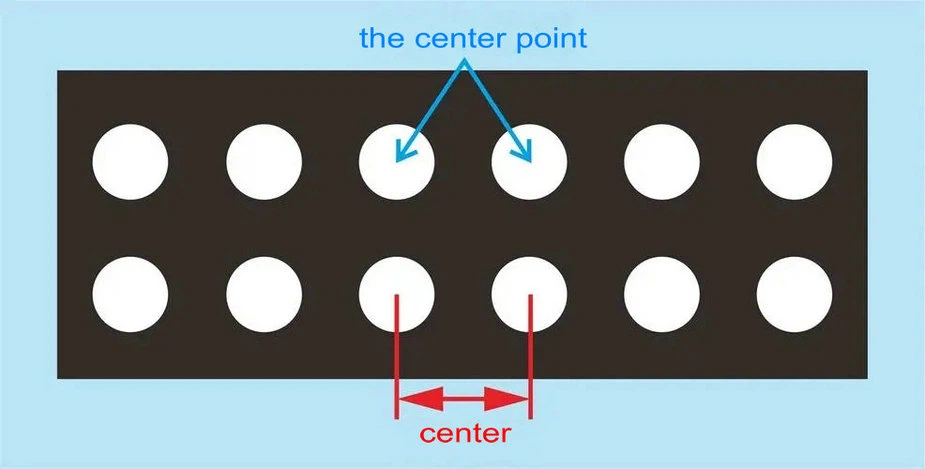
Module size and pixel pitch: First, you need to know the physical size of the module (such as 250mm x 250mm) and the pixel pitch (such as 3.91mm). The pixel pitch is the distance between the center points of the adjacent LED lamps.
Calculate the module resolution: module size ÷ pixel pitch, to calculate the horizontal and vertical resolution of the module.
For P3.91 module:
Horizontal resolution = 250mm ÷ 3.91mm ≈ 64 (rounded up) pixels
Vertical resolution = 250mm ÷ 3.91mm ≈ 64 (rounded up) pixels
Therefore, the resolution of a single P3.91 module is 64x64 pixels.

How to calculate the quantity of modules for an LED display?
If the customer requests an LED display with a 16:9 ratio, 4800mm wide x 2700mm high.
Quantity of horizontal modules = display width ÷ module width ≈ 4800mm ÷ 250mm ≈ 20 (round up)
Quantity of vertical modules = display height ÷ module height ≈ 2700mm ÷ 250mm ≈ 11 (round up)
Therefore, the actual size of the LED screen will be 5000mmx2750mm.
To calculate the total resolution: module quantity x module resolution the resolution of the display.
Total horizontal pixels = 64 pixels/module × 20 modules = 1280 pixels
Total vertical pixels = 64 pixels/module × 11 modules = 704 pixels
Therefore, the resolution of this LED display is 1280x704 pixels.
