

When I first started out as a LED display supplier, I once learned a tough lesson about transporting gear for an outdoor event. I’d wrapped my P4.81 display modules in bubble wrap and stuffed them into a standard cardboard box, assuming that would be enough. By the time I unloaded them at the venue, several modules had cracked, connections were loose, and half the screen wouldn’t light up. That mistake cost me not just repair fees, but also a client who’d booked us for three more events. Since then, I’ve refined my transport process specifically for P4.81 LED displays—gear that’s built for outdoor use but still fragile enough to suffer damage if handled wrong. Today, I’m sharing what I’ve learned to make sure your LED displays arrive exactly as they left our warehouse: ready to shine.
First, let’s break down why P4.81 LED displays are unique when it comes to transport. P4.81 refers to a 4.81mm pixel pitch, which means each pixel is slightly more spaced out than smaller-pitch indoor displays, but the modules themselves are still made of delicate SMD (Surface-Mount Device) LEDs, printed circuit boards (PCBs), and lightweight aluminum frames that can bend or crack if jostled. Unlike indoor displays, outdoor models like the ones we offer—such as our Outdoor Super High Brightness SMD Front Service Modular Anti-Dust IP67 LED Display With Water Proof Front Maintenance LED Tile For LED Signs—are built to resist elements, but that doesn’t mean their internal parts can survive rough handling. Even a small impact to a module’s driver IC (integrated circuit) can cause dead pixels, which are a nightmare to fix once the screen is mounted.
The first step to safe transport is prepping the modules before they even leave the warehouse. I’ve seen too many teams skip this, which leads to avoidable damage. Start by disconnecting all cables gently—don’t yank them from the modules or the controller box. Each cable has a specific lock; we make a point to teach our clients (and our own team) to twist the lock until it releases, not pull. Next, secure each module in a custom-fitted foam insert. Generic bubble wrap can shift during transit, leaving corners exposed. Our foam inserts are cut to match the exact dimensions of our P4.81 modules, so each one is held snugly in place, with extra padding around the edges where the frame connects to the PCB. We also label every module with a number and its position on the screen (e.g., “Row 2, Module 3”)—this not only speeds up setup, but also ensures no modules get lost or mixed up during transport. One client once lost two modules because they weren’t labeled, and by the time we found them, the exposed LEDs had been damaged from being jostled in a separate box. Don’t make that mistake.

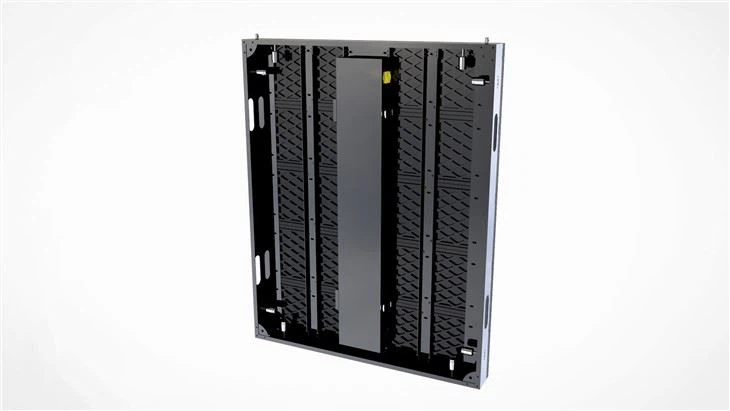
Once the modules are prepped, the packaging itself matters. I used to use standard shipping crates, but I switched to heavy-duty, double-walled wooden crates with internal bracing after that initial bad experience. The crates need to be sized so the foam inserts sit tight—no sliding around inside. If you’re using multiple crates for a large P4.81 display (say, a 10x5 screen that needs 50 modules), mark each crate with its total number of modules and the screen’s final size. For smaller jobs, we use reinforced plastic cases instead of wood; they’re lighter, water-resistant, and can be reused for future events. A common trick I’ve picked up: add a layer of desiccant packets to each crate, especially if you’re transporting to a humid location. Even IP-rated displays like our OFE Series Outdoor IP66 10,000nits Front Access anti-dust & anti insect Light Weight Flat Led Display LED Cube & Right Angle Led Screen can develop condensation inside their enclosures if they’re moved from a cold warehouse to a hot, humid venue, which can short out connections. The desiccant absorbs excess moisture, preventing that issue.
Loading and unloading are just as critical as the packaging. I’ve seen teams rush this, stacking crates haphazardly on top of each other. Never place anything heavy (like tools, another crate, or even a speaker) on top of a LED display crate—even a small weight can compress the foam inserts and crack a module over time. When lifting crates, use a forklift with soft forks (covered in rubber padding) instead of metal forks, which can dent the crate and damage the modules inside. If you’re moving crates by hand, use at least two people; these crates aren’t empty—each P4.81 module is roughly 5kg, so a full crate of 10 modules is 50kg. Lifting alone can lead to dropped crates, which is the easiest way to break a module. Also, keep crates level at all times. Tilting a crate too far can make the foam inserts shift, and if a module slides into the side of the crate, it can break the LED matrix. I always tell my team: treat the crate like it’s holding a glass of water—no sudden moves, no tilting, no rushing.
Transporting the display in a vehicle requires attention to how the crate is secured. Even if you’ve packed it right, if the crate slides around in the back of a truck, all that prep work goes to waste. Use non-slip rubber mats at the bottom of the truck bed to keep crates from sliding, and ratchet straps to secure them tightly—but not so tight that they crush the crate. I once saw a team strap crates so tight that the foam inserts were compressed, and when they unloaded, two modules had their frames bent. The right amount of tension is enough to prevent movement, but not enough to warp the crate. If you’re using a van, make sure the crate doesn’t stick out past the rear of the vehicle—this can cause it to bounce or get hit by other cars, especially on highways. Also, avoid transporting the display in the back of a pickup truck without a covered bed; rain or even road spray can seep into the crate, even if it’s water-resistant. We once had a client drive a pickup from our warehouse to a festival, and a sudden rainstorm soaked the crate—despite the IP rating, the internal cables had moisture on them, so they had to wait two hours for the modules to dry before setting up. A cover takes two minutes to put on, and it saves you a lot of trouble.
Once you arrive at the venue, don’t rush to unload the crates right away—give them time to acclimate. If you’re moving from a temperature-controlled warehouse (say, 18°C) to a sunny outdoor venue (30°C), the condensation I mentioned earlier can form on the modules’ internal parts. We tell our clients to leave the crates in a shaded area for at least 30 minutes before opening them. Once you open a crate, handle the modules with care—use two hands to lift each one, holding it by the aluminum frame, not the PCB or the LED panel. P4.81 modules are designed for front access, like our Litestar OFM PRO 2x1ft Outdoor Front Service LED Sign Panel, which makes setup easier, but the front LED surface is still scratch-prone. Don’t drag modules across the ground, and avoid setting them directly on concrete; use a soft mat (like a yoga mat or foam board) to place them on.
A few extra tips I’ve picked up over the years: never transport the display with cables connected. Even if you’re careful, a jolt can loosen the connections, and when you go to set up, you might have a cable that won’t plug in, or worse, a cable that pulls on a module’s port and breaks it. We always disconnect all cables before packaging, and label each cable with its corresponding module number—this makes setup faster and reduces the chance of misconnection. Also, for long-distance transport (over 500km), add a layer of bubble wrap around each individual module, even if you used foam inserts. Highway vibrations are different from city driving, and that extra layer of protection can prevent small cracks that show up after you’ve set up the screen.
I know it can be tempting to cut corners on transport to save time or money, but from my experience, that almost always leads to more costs and headaches. A broken module means replacing it, which can take days, and if you’re at an event, that can mean losing money on the job. Taking the time to prep, package, load, and transport safely pays off in the long run.
If you’re looking for reliable P4.81 LED displays that are built to withstand transport (and outdoor conditions), we have a range of front-serviceable models that are perfect for mobile events, festivals, and outdoor installations. From our P10.66 OFD Series Outdoor Light-weight Fixed LED Display With Front Maintenance Water Proof Module For Outdoor LED Digital Sign to our P10/P16mm Ultra High Brightness (10,000nits) Outdoor Fixed Installation Front Serviceable LED Display/Screen. It Is Perfect for Wall Mounting Outdoor LED Video Wall and No Need AC for Cooling, each one is designed with durable frames and easy-to-secure modules that travel well.
If you’re planning a project and want to make sure your LED display arrives safely, or if you have questions about transport best practices, don’t hesitate to reach out. We’re always happy to share the lessons we’ve learned (and the mistakes we’ve made) to help your project go smoothly.
References
- LED Display Module Transport Guidelines, International Sign Association, 2022.
- Outdoor LED Display Durability Testing, Digital Signage Federation, 2023.
- Front-Service LED Display Installation Best Practices, LED Professional Association, 2021.